This website runs on quartz 4, a static website generator for publishing parts of your obsidian vault as a wiki. It’s designed to be modified, so it should be no surprise that I’ve done exactly that. Some may be of interest to others so I’ll dump ‘em here. Not all are yet published here, and some I don’t plan to publish here (like the way my unlisted posts work).
visual
recent notes in index page
in your quartz.layout.ts, defaultContentPageLayout:
  afterBody: [
    Component.ConditionalRender({
      component: Component.RecentNotes({ title: "Recent writing", limit: 5, filter: (f) => !f.frontmatter?.hideinrecent, }),
      condition: (page) => page.fileData.slug === "index",
    }),
  ],
The hideinrecent filter is an optional nicety, it lets you mark certain pages as excluded from it.
css tweaks
these all go in your quartz/styles/custom.scss
cute keyboard icons
/* Make keyboard elements cute */
kbd {
    background-color: var(--lightgray);
    border: 1px solid var(--gray);
    border-radius: 4px;
    box-shadow: 0 2px 0 var(--gray);
    padding: 2px 6px;
    font-size: 0.85em;
    font-family: inherit;
}
Used like so <kbd>Ctrl</kbd>, looks like so: Ctrl
remove date from index page
/* "I would like to see when this blog main page was updated and how long it takes to read", said nobody ever */
body[data-slug="index"] .content-meta {
    display: none;
}
remove table of contents from index page
/* "I would like to have a table of contents of the index page", said some people probably */
body[data-slug="index"] .toc {
    display: none;
}
add a slash after folders on folder view pages
/* add a folder marker within folder lists */
.section-li a.internal[href$="/"]::after {
    content: "/";
}
easier to click links in explorer
/* make links a large block so you can just click the general area without your mouse clicking through */
.explorer-content ul li > a {
    display: block;
    transition: all 0.3s ease;

    /* make them have a highlight on hover */
    &:hover {
      opacity: 0.95;
    }
}
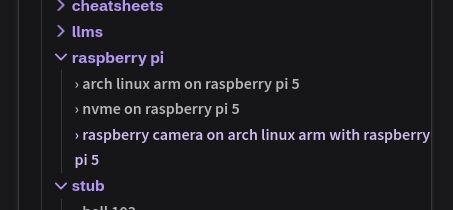
bugfix for long titles leaking into post on mobile
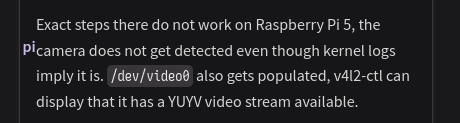
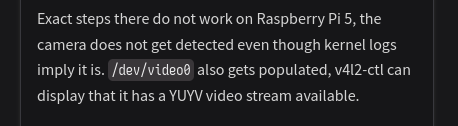
Someone forgot to account for margins for sizing of the explorer, so 1rem of text can leak out of it on mobile with really long titles.
Expand for pictures

And when fixed:
/* bugfix for long item names */
@media (max-width: 800px) {
  .explorer .explorer-content {
    width: calc(100vw - 1rem) !important;
    max-width: calc(100vw - 1rem) !important;
  }
}
symbol before table of content items
/* display a helpful separator before each item in the table of contents */
ul.toc-content > li > a::before {
    content: "› ";
}
lowercase text for the default components
/* lowercase a bunch of the original text */
footer,
button.toc-header > h3, /* table of contents text */
.graph > h3, /* graph text */
nav.breadcrumb-container > div.breadcrumb-element:nth-child(1),  /* "Home" */
.backlinks h3 /* backlinks text */ {
    text-transform: lowercase;
}
explorer config tweaks
these all go in quartz.layout.ts, see css tweaks for some other explorer tweaks though.
folders collapsing/expanding instead of being entered on click
    Component.Explorer({
      ...
      folderClickBehavior: "collapse",
      ...
    }),
symbol before item names
this is good for better separation with long names
    Component.Explorer({
      ...
      mapFn: (node) => {
        if (!node.isFolder) {
          node.displayName = "› " + node.displayName
        }
      },
      ...
    }),
dynamic tertiary color
tertiary color is used for hovers in the explorer, alongside a few other things. it’s a bit annoying to tweak it every time you’re trying to decide on a color scheme.
you can have it be dynamically generated based on your secondary color. within your quartz.config.ts, set tertiary as follows:
colors: {
  lightMode: {
    ...
    tertiary: "color-mix(in srgb, var(--secondary), yellow 15%)", // original: #84a59d
    ...
  },
  darkMode: {
    ...
    tertiary: "color-mix(in srgb, var(--secondary), lightyellow 35%)", // original: #84a59d
    ...
  },
},
client-side checkable checkboxes
- do you like checkboxes?
- like the ones in the recipes folder, like lasagna?
- you want them to be checkable?
in your quartz.config.ts, find Plugin.ObsidianFlavoredMarkdown and add enableCheckbox: true within the curly brackets (separated by comma from previous items).
dark/light mode by default
by default, quartz uses the browser’s reported color setting for the theme. if you want to force this to something else, that takes a change in quartz/components/scripts/darkmode.inline.ts.
On the line const currentTheme = localStorage.getItem("theme") ?? userPref, change userPref to light or dark. This blog defaults to dark mode by default.
technical
match-git-timing.sh
This is a script that I have in the build CI that runs over the entire folder and changes the timestamp on disk to the latest change on git. This makes it so that I can symlink my content folder and still have it use correct dates. I have quartz.config.ts modified to set Plugin.CreatedModifiedDate to have priority of priority: ["frontmatter", "filesystem"], (⇒ git is excluded).
#!/usr/bin/env bash
git ls-files | while IFS= read -r file; do
  timestamp=$(git log -1 --format='%cI' -- "$file")
  [ -n "$timestamp" ] && touch -d "$timestamp" "$file"
done
cfEmailDecode
Custom component, need to publish this. When SPA is enabled, cloudflare obfuscates emails but doesn’t deobfuscate them when you navigate to another page in a SPA setup.
This exists in quartz.layout.ts as sharedPageComponents→afterBody, triggers after DOM change, re-injects cloudflare’s email decoding script if there’s obfuscated emails within the page. Relevant for me within index.
HScroll
Custom component, need to publish this. Adds a cool carousel for images and whatnot. See it in action on playing with vlm-generated alt text.